Planning
How to Collect Guest Dietary Requirements and Get Them to the Caterer
Collect dietary needs through your RSVP or guest list spreadsheet, export them for the caterer, and print them on place cards for the serving staff.
5 min read
Build a drag-and-drop seating chart for events of any size — from an intimate dinner to a 2,000-guest wedding, gala, or conference — and share it through a single QR code. Guests find their seat in seconds by name, alphabetically, or by table.
Free for up to 30 guests·$9.99 per event beyond that
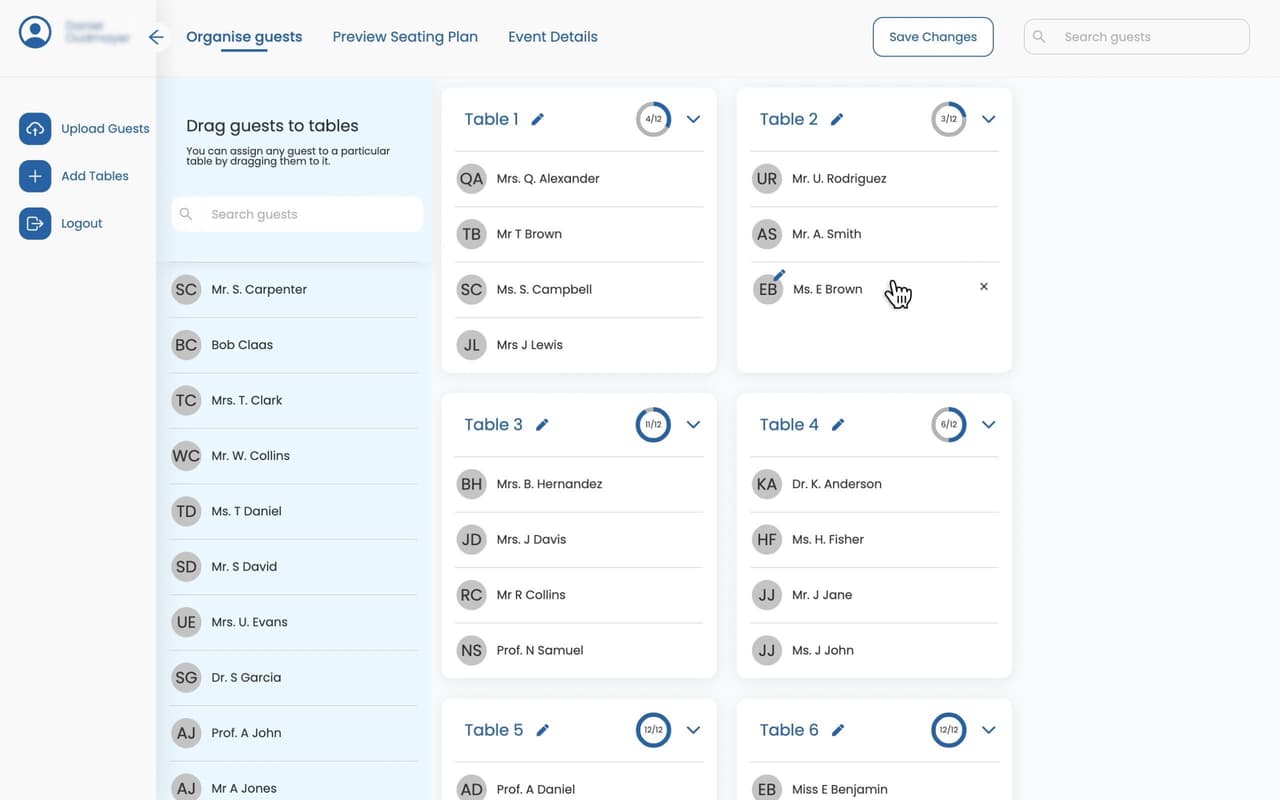
How it works
Upload your guest list, drag each name to a table, and share the generated QR code. The first 30 guests per event are free.
Free templates
Once everyone is seated, use our free, fully customizable Canva templates as inspiration. Hover any design, copy the link, and drop in your event's unique QR code. Printable in all standard sizes (A1–A4).

Classic Wedding Seating Chart

Bat Mitzvah Seating Chart

Birthday Party Seating Chart

Christmas Celebration Seating Chart

Baby Shower Seating Chart

Graduation Party Seating Chart

Company Gala Seating Chart

Quinceañera Seating Chart
What's included
Core features available on every account, including the free tier. Place cards are a one-time add-on.
Every seating plan generates a shareable link and QR code. Guests scan once and instantly see their table.
Move a guest and the change syncs instantly. The QR code never needs to be reprinted.
Plan a wedding, a corporate gala, and a sweet 16 from the same dashboard. Each event has its own guest list, chart, and QR code.
Seat hundreds or thousands of guests across dozens of tables. Find anyone in a single keystroke, and let guests find their own seat just as fast — by search, alphabetically, or by table.
Link guests who should always sit together — couples, families, whole teams — and dragging one person in the seating organiser moves the entire group with them. One click links a table, or everyone who shares a surname.
Skip the table-building step. Upload your guest list with table names already assigned, and we'll create and size the tables for you — no manual layout required.
Arrange tables and props — dance floor, bar, DJ booth, and more — on an infinite canvas, then share it with guests in one click.
Add a Dietary column to your guest spreadsheet, or type needs in per guest. They export with your guest list, ready for the caterer, and never appear on the seating plan guests see.
A card for every seated guest with their name and table, in your seating plan's fonts. Folded or flat, US Letter or A4, with dietary symbols for the serving staff. Preview free, print at home.
$10 one-time per event · included with RSVP & Invitations
Reviews
We used Simplify Tables for a very large fundraising event last year, and it was a game changer. Guests could simply scan a code and instantly find their seats, which made registration fast, organized, and stress-free. Our registration volunteers loved it — and happy check-in volunteers are priceless. They are already begging me to use it again this year because of how smoothly everything ran. True to its name, Simplify Tables really is simple… so simple even our most tech-challenged committee members looked like pros. Highly recommend!
I used Simplify Tables for my daughters Quince party and it was fantastic. I was able to save money bc it was all digital and so user friendly. It was easy to make changes, which I had to do even on the day of. I also loved that I could customize it with a picture of my daughter as the background. It was absolutely beautiful. Loved, loved, loved it and would highly recommend. Paper seating charts are a thing of the past !!!
Used Simplify Tables for a big international event and absolutely loved it. Certainly made creating and managing the table plan so much easier than I expected. Made dealing with last minute changes an easy thing to over come. A brilliant tool for event organisers.... Slick and professional!
Simplify Tables makes the whole seating arrangement process so much easier. You just upload your guest list, drag and drop names onto tables, and it automatically generates a QR code that guests can scan to find their seat. No more crowding around a paper chart! The real-time updates are a game-changer — you are able to shuffle people around right up until the day before, and the QR code never needs to be reprinted. The customisation options (background image, fonts, event name) keeps everything on-brand with your theme. Highly recommend for weddings, corporate events, or any gathering with assigned seating.
Two views of your plan
Same guest data, one toggle. Switch between the list and an infinite canvas of the room any time — Simplify Tables remembers which view you left off on for each event.
The Organise screen on desktop gives you two views of the same plan. Stick with the list to power through names fast, or switch to the Floor plan view — an infinite canvas you pan and zoom, with a “Fit view” button that frames the whole room. Nothing about seating rules or capacity warnings changes between the two; it's the same event, viewed two ways.
Drag guests straight onto tables in the room layout, add the props that make the venue recognisable, and when the layout's ready, hit “Use as floor plan” — it becomes the guest-facing floor plan guests see when they scan the QR code, with every table's pin placed automatically.
Part of the Organise experience on desktop. Prefer to upload a photo or PDF of the venue instead? That works too — the canvas is one of two ways to build your floor plan.
The signature feature
Guests switch between the venue floor plan and the guest list with a single tap — the only seating planner that turns a wall of names into a “you are here.”
Help every guest find their table at a glance. Upload a photo or map of your venue, then drop a pin for each table — one click to place, move, or relabel. Every pin shows its table number and is colour-coded by how full the table is, so the layout reads clearly the moment it loads.
When guests scan the QR code, they see your venue come to life: tap any pin to instantly reveal who's seated there. No more crowding around a printed chart at the entrance — just a beautiful, interactive floor plan that guides everyone to their seat.
Make it yours
Full control over how your guest list looks, so it matches your invitations, your venue, and your style — a polished, on-brand seating plan that feels designed, because it is.
Choose distinct fonts for your event title, guest names, table numbers, and letter headings, then fine-tune their sizes and spacing until everything sits just right.
Set your own colours for text, buttons, and the page background, then drop in a background image with adjustable overlay opacity so it matches your invitations and venue.
Decide whether guests are grouped alphabetically by name so they find their own seat in seconds, or by table so they can see who else is sitting with them.
Every change appears instantly in a live phone preview, so you always know exactly what your guests will see before you share it.
New: RSVP & Invitations
Send every household your invitation and an online RSVP. When guests reply, you see who's coming on the seating chart you're already building. No spreadsheet to copy across from a separate RSVP tool.
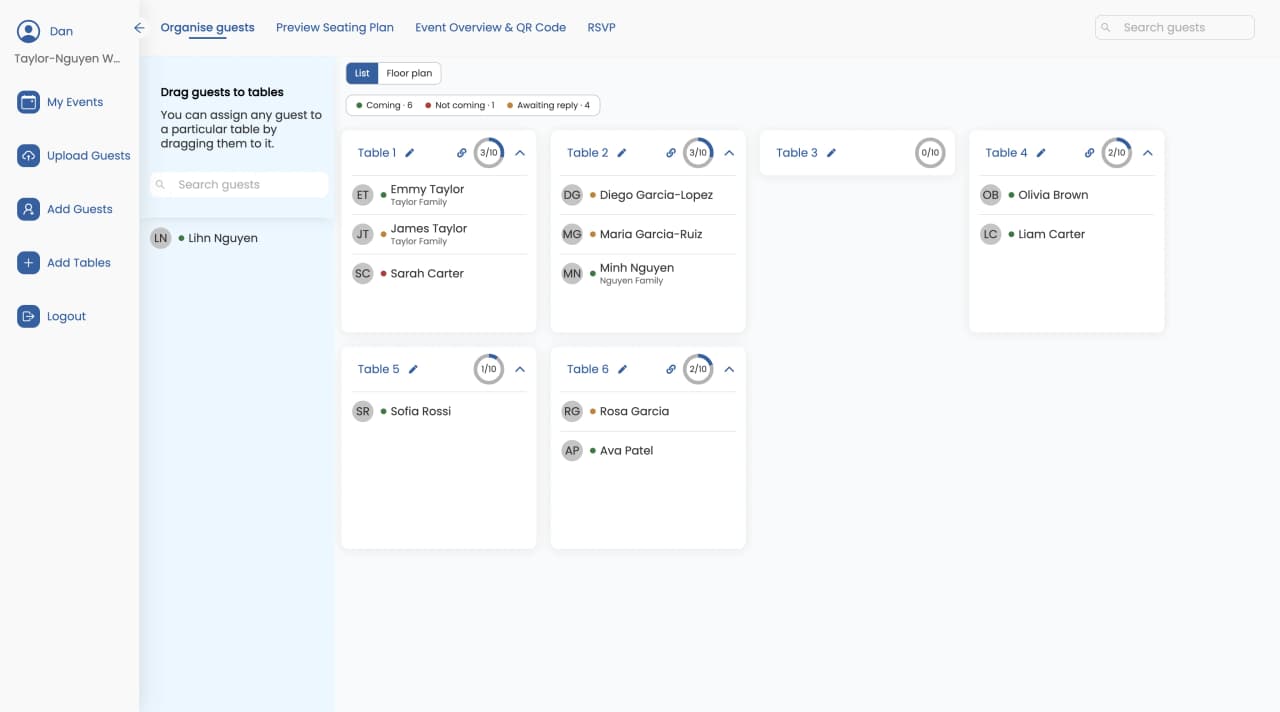
$60 one-time per event, or $50 if you've bought Unlimited Guests. Set everything up before you pay.
See how online RSVP worksUse cases
Weddings, corporate events, and private celebrations — any event with assigned seating, from 20 to 2,000+ guests.
Share your seating plan with a co-planner, venue, or caterer by sending a single link. Everyone sees the same live chart, so updates never fall out of sync.
Simplify Tables handles large guest lists without slowing down. Collapsible table views, instant search, and drag-and-drop make it fast to seat 30 guests or 2,000.
Create as many events as you need on one account. The first 30 guests of every event are free; unlock unlimited guests for a single event with a one-time $9.99 payment.
Want to get started?
Sign UpCorporate Events
Celebrations
Special Occasions
From the guides
Practical answers to the questions every event planner runs into — from head-table etiquette to fitting 200 guests in a venue.
Collect dietary needs through your RSVP or guest list spreadsheet, export them for the caterer, and print them on place cards for the serving staff.
5 min read
SimplifyTables is a browser-based seating chart builder designed for a full-size screen. A point-by-point correction of the mobile-first and subscription claims.
9 min read
Skip building your table layout by hand. Add a table-name column to your guest list spreadsheet, and named tables get created automatically, sized and ready.
4 min read
Questions
Everything you need to know about our seating planner.
Simplify Tables is a seating planner app for weddings and events of any size, from intimate dinners to galas and conferences with thousands of guests. You drag and drop guests onto tables, and the app generates a digital seating chart that guests open by scanning a QR code — they find their seat by searching their name, browsing alphabetically, or viewing by table.
There is no upper limit. Simplify Tables is built for large events and routinely powers seating charts with hundreds or thousands of guests across dozens of tables — weddings, galas, conferences, corporate dinners, and fundraisers. The drag-and-drop builder, instant guest search, and collapsible table views keep even a 2,000-guest plan fast to build, and guests find their own seat in seconds by name search, alphabetical list, or table number.
Yes. Every event you create includes a free trial for up to 30 guests. You can build the full seating chart, generate the QR code, and share it with those 30 guests without paying anything.
Seating is free for events with up to 30 guests. Unlimited Guests is a one-time $9.99 per event for any size of guest list. RSVP & Invitations is a one-time $60 per event ($50 if you already bought Unlimited Guests) and adds online RSVP, email invitations, your digital invitation and printable place cards. Printable place cards are a one-time $10 add-on per event on Free or Unlimited Guests. Everything is a one-time payment per event — no subscription.
Yes, on every plan, including Free. Add a "Dietary" column to your guest spreadsheet ("Dietary Requirements", "Dietary Needs", "Diet" and "Allergies" also work as the header) with free text like "Vegan, nut allergy", "Gluten free" or "Halal". Cells that say "None" or "N/A" are ignored. Already uploaded your guests? Re-upload the sheet with the Dietary column added and the needs are filled in on the guests already in your event, with seating unchanged. You can also type or edit them per guest in the app, and with RSVP & Invitations, the answers guests give to a dietary question on their RSVP fill in the same field. Dietary needs appear as a column in your guest list export (Excel or CSV), ready to send to the caterer or venue.
No. Dietary needs are private to you as the organiser. They never appear on the seating plan guests open from the link or QR code.
Yes. Simplify Tables makes a print-ready file with a card for every seated guest, showing their name and table in the same fonts as your seating plan. Choose folded tent cards (4 per page, 3.5 × 2.5 in once folded) or flat cards (10 per page, business-card size), on US Letter or A4. Print at home on card stock or take the file to a print shop; cut and fold lines are printed on the sheet. Order the cards by table or A–Z, and optionally add your event name to each card. You can print as many times as you like, including after seating changes.
No. Place cards are made from your seating plan, so every seated guest already has a card with their name and table.
Yes. Place cards can carry dietary symbols for the serving staff: V (vegetarian), VG (vegan), P (pescatarian), GF (gluten-free), DF (dairy-free), N (nut allergy), SF (shellfish), H (halal), K (kosher), and ✱ for anything else. On folded cards they print on one side only, so they face the guest's own seat rather than the whole table. A dietary key page for the venue prints with the set. You can switch the symbols off.
Printable place cards are included at no extra cost with RSVP & Invitations. On Free or Unlimited Guests, they are a one-time $10 add-on per event. You can preview your cards free before paying.
Yes, with RSVP & Invitations. Each household gets a private link to your invitation, and one person replies for everyone in it. When guests reply, you see who's coming right on your seating chart, along with answers to questions like meal choice. Guests don't need an account.
Yes. One account supports unlimited events. Each event has its own guest list, seating chart, QR code, and free 30-guest trial. You only pay $9.99 for the individual events that go over 30 guests.
No. Guests scan the QR code or open the shared link in any mobile browser. They immediately see the event page with their table assignment — no download or account required.
No. The QR code and link stay the same for the life of the event. Any edits you make to the seating plan appear for guests in real time.
Yes. Upload a custom background image, set the event name, and choose from the full Google Fonts library to match the style of your wedding or event.
Yes, and it is optional. If you upload a floor plan image for an event, guests get the Floor Plan Toggle when they scan the QR code — they switch between the floor plan view and the guest list view with a single tap. Skip the upload and guests just see the guest list.
Yes. As the event planner, you choose how guests see the guest list when they scan the QR code — alphabetical (A–Z by guest name) is the fastest way for a guest to find their own seat, while grouping by table number makes it easy to see who is seated together at each table. You set this in the dashboard and can change it at any time; the guest view updates in real time.
Yes. Upload a CSV or Excel file and each name becomes a draggable item you can place on a table.
Email support@simplifytables.com. The support team replies seven days a week, usually within a few hours.
Can't find the answer you're looking for? Chat to our friendly team.
Contact SupportPricing
Free for up to 30 guests per event. Pay once per event, only for what you need. No monthly fees.
Plan any event for up to 30 guests at no cost.
Unlock unlimited guests for a single event. Pay only for the events that go over 30.
Collect RSVPs online and see replies on your seating chart. $50 if you've already bought Unlimited Guests.
Set up households, your invitation and questions before you pay.
Get StartedHow online RSVP worksNewPrintable place cards are a one-time $10 add-on per event on Free or Unlimited Guests, and included at no extra cost with RSVP & Invitations. Preview them free before you pay.