RSVP & Invitations
Online RSVP that lands on your seating chart
Simplify Tables' online RSVP gives every household a private link to your invitation. When guests reply, you see who's coming right on the seating chart you're already building, so there's no spreadsheet to copy across from a separate RSVP tool. Built for weddings, galas, fundraisers and any event with a guest list.
$60 one-time per event·$50 if you've bought Unlimited Guests·No subscription
Set up households, your invitation and questions before you pay.
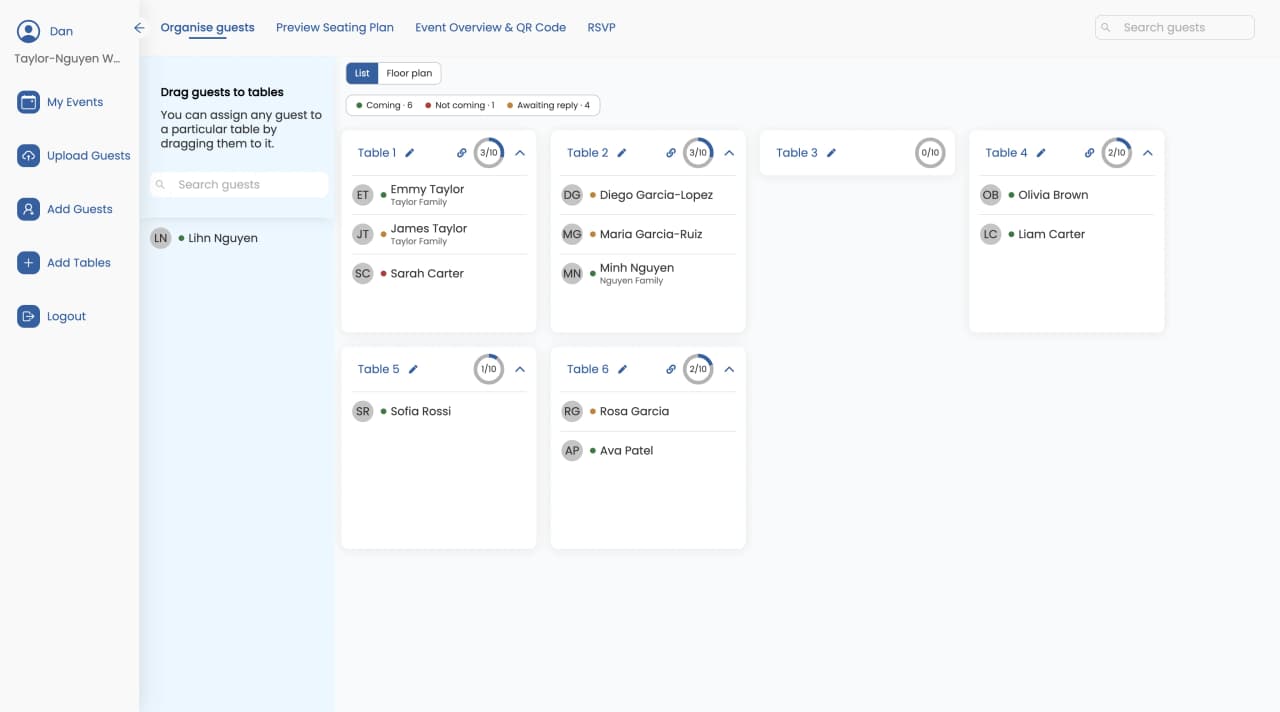
RSVP and seating chart in one place
Most couples and hosts collect RSVPs in one tool, export a spreadsheet, then rebuild the list in their seating chart. Every late reply means doing it again.
With Simplify Tables, the RSVP page and the seating chart share one guest list. When a household replies, you see who's coming right where you're seating them, and you can drag them onto a table straight away.
How online RSVP works
- 1
Group your guests into households
Start from the guest list you are already seating. One click creates households by surname, and each household gets one private RSVP link.
- 2
Add your invitation and questions
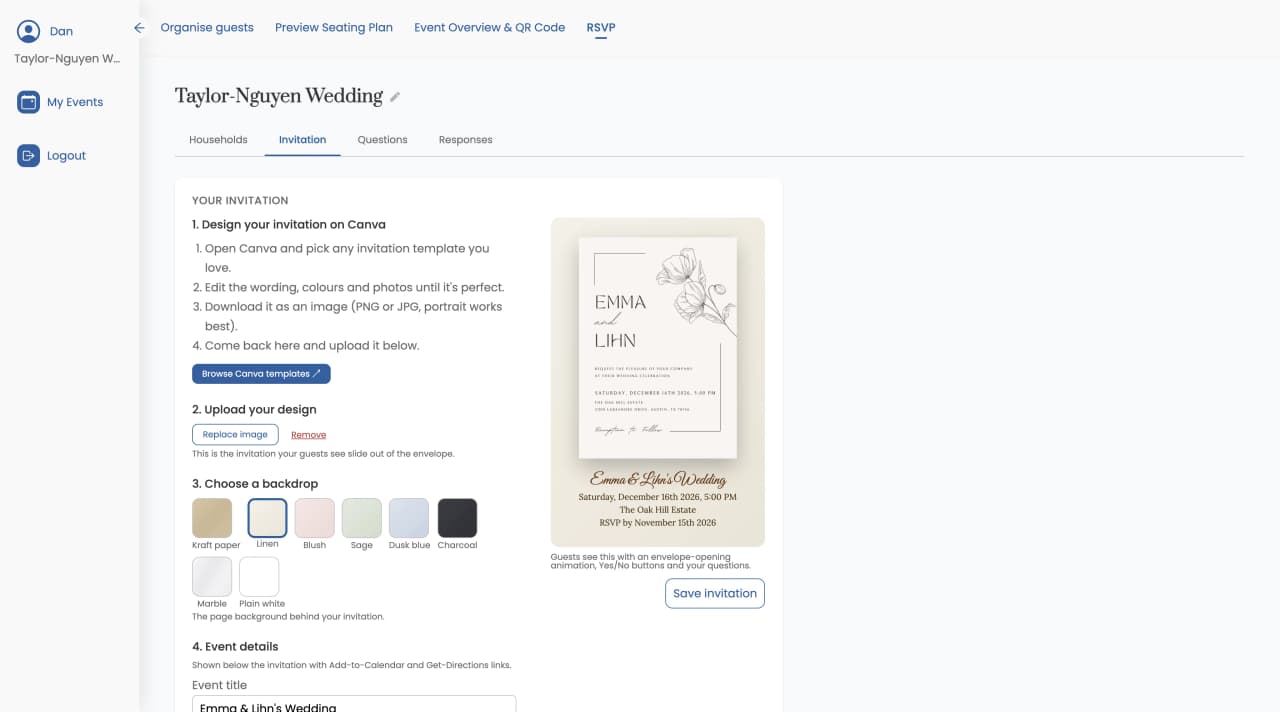
Upload the invitation you designed in Canva, pick a backdrop, fonts and colours, add your event details, and add questions such as meal choice or dietary requirements.
- 3
Put the RSVP page live and send it
Pay once for the event, then email every household an invitation with a button to RSVP, or copy each household's link and send it by WhatsApp or text.
- 4
Seat guests as replies come in
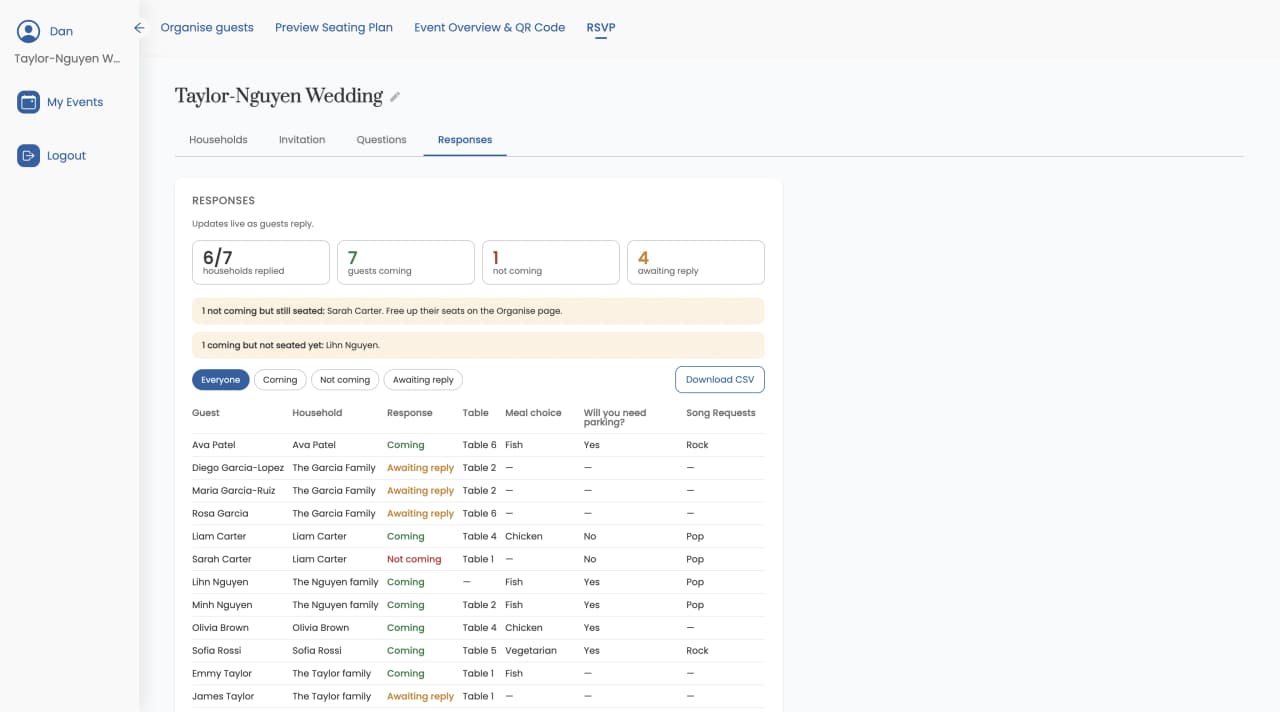
As guests reply, you see who's coming on your seating chart and in the live responses dashboard. Download every response as a CSV whenever you need it.
Steps 1 and 2 are free. Payment is only needed to put the RSVP page live and send emails.
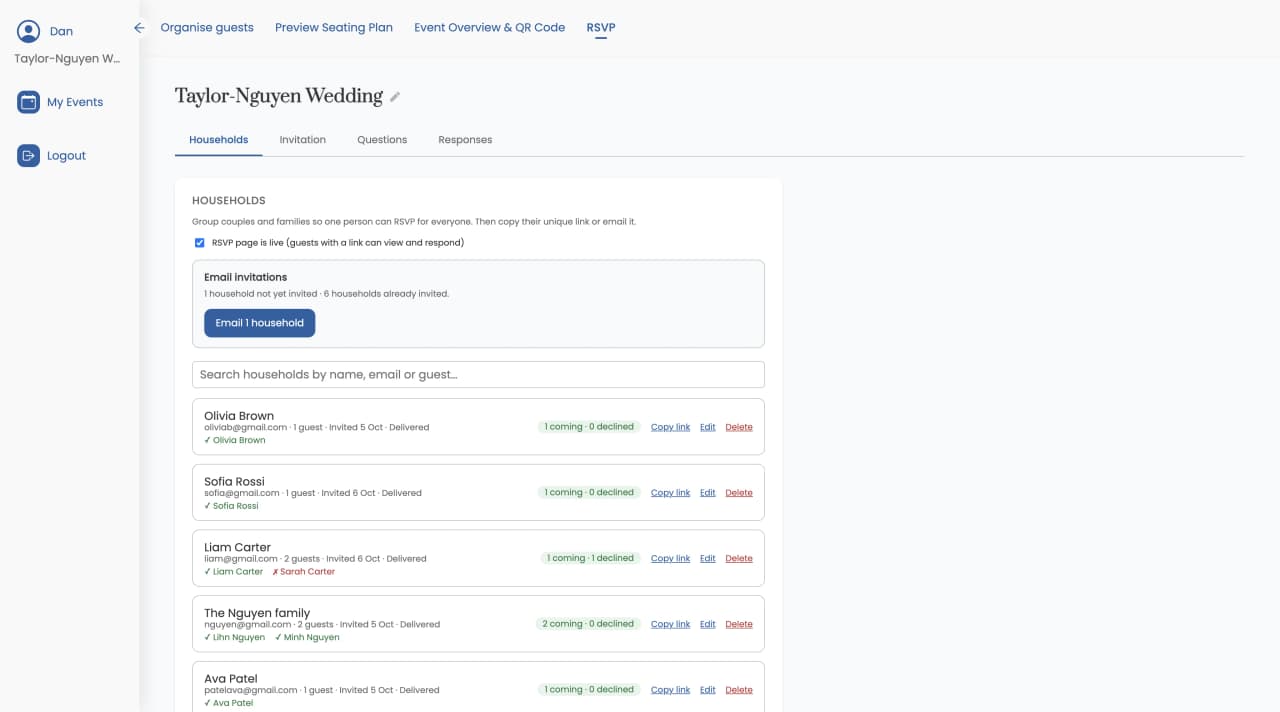
Group guests into households, then email each one or copy their link.
One link per household, one reply for the family
Guests are grouped into households, and each household gets one private link. One person replies for everyone in it, so a family of five answers once, not five times.
You don't have to build households by hand. One click creates them from your guest list by surname.
A wedding RSVP website guests can use without an account
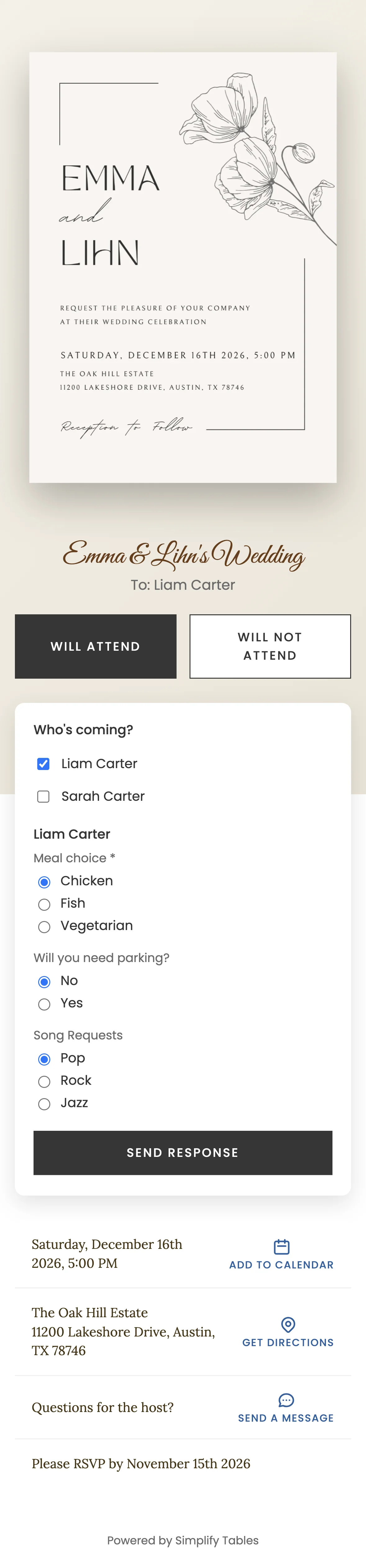
Every household's RSVP page shows your invitation and the details guests need, and replying takes a couple of taps.
No accounts or passwords
Guests open their link, tap Will Attend or Will Not Attend, and they are done. Works on any phone.
Date with Add to Calendar
Guests see the event date and can add it to their calendar in one tap.
Venue with Get Directions
Guests see the venue and can open directions straight from the RSVP page.
RSVP-by date
Guests see your reply deadline, so they know when to answer.
Send a message to the host
An optional note field lets guests send you a message with their reply.
Change a reply later
Plans change. Guests can open their link again and update their answer.
Digital wedding invitations with RSVP, designed in Canva
Design your invitation in Canva using any of its free templates, then upload it. Guests see it revealed with an envelope-opening animation, over a backdrop you choose, in your choice of fonts and colours.
Collect meal choices and dietary requirements
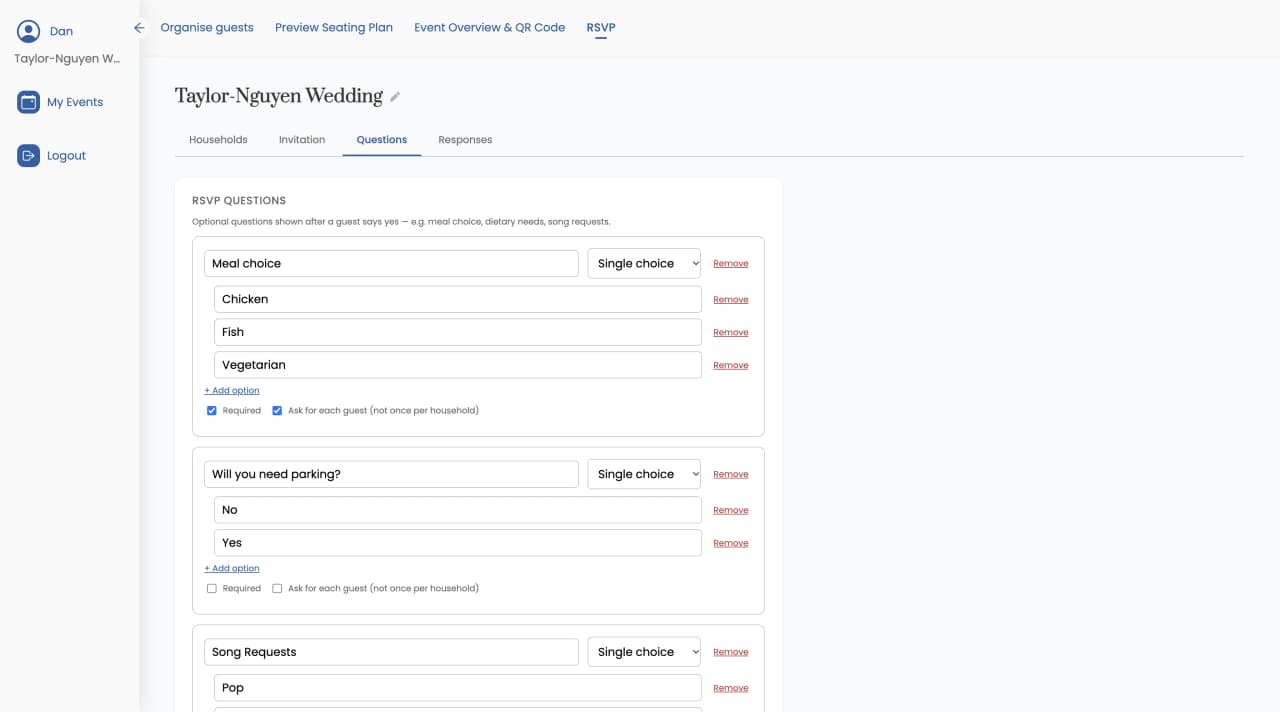
Add your own questions: meal choice, dietary requirements, song requests, anything you need to know. Each question can be single choice, multiple choice or free text.
Ask a question per guest (everyone picks their own meal) or once per household (one song request per family). Guests who decline aren't asked the meal questions.
Send by email, WhatsApp or text
Email invitations
Send each household an email with a button to view the invitation and RSVP.
Copy the link
Copy any household's link and send it yourself by WhatsApp, text or whatever the family group chat uses.
Track every reply in one guest list manager
The live responses dashboard shows every guest as coming, declined or awaiting, along with their answers. You can see who hasn't replied yet, copy their household's link and send it to them directly.
- Coming, declined and awaiting for every guest
- Answers to your questions alongside each reply
- Download responses as CSV for your caterer
Pricing
Simple per-event pricing
Free for up to 30 guests per event. Pay once per event, only for what you need. No monthly fees.
Free
Start herePlan any event for up to 30 guests at no cost.
Unlimited Guests
Unlock unlimited guests for a single event. Pay only for the events that go over 30.
RSVP & Invitations
NewCollect RSVPs online and see replies on your seating chart. $50 if you've already bought Unlimited Guests.
Set up households, your invitation and questions before you pay.
Get StartedOnline RSVP questions
Do my guests need to create an account to RSVP?
No. Each household gets its own private link. Guests open it, tap Will Attend or Will Not Attend, answer any questions you added, and they are done. No account, no password, no app to install, and it works on any phone.
Can one person RSVP for their whole family?
Yes. Guests are grouped into households, each household gets one link, and one person replies for everyone in it. You can create households automatically from your guest list by surname in one click.
Can I collect meal choices and dietary requirements?
Yes. Add your own questions, such as meal choice, dietary requirements or song requests. Each question can be single choice, multiple choice or free text, and asked per guest or once per household. Guests who decline are not asked the meal questions.
How do I design my invitation?
Design it in Canva, which has free invitation templates, then upload it to Simplify Tables. Guests see it revealed with an envelope-opening animation over a backdrop you choose, with your choice of fonts and colours.
Can guests change their RSVP?
Yes. Guests can open their link again and change their reply later.
Can I send the RSVP link by WhatsApp or text instead of email?
Yes. Copy any household's link and send it however you like: WhatsApp, text or any messaging app. You can also email each household an invitation with a button to view the invitation and RSVP.
Is RSVP & Invitations a subscription?
No. It is a one-time payment of $60 per event, or $50 if you've already bought Unlimited Guests. You can set up your households, invitation and questions before paying. Payment is only needed to put the RSVP page live and send the emails.
How do RSVPs connect to my seating chart?
The RSVP page runs off the same guest list as your seating chart. When guests reply, you see who's coming right on the seating chart you're already building, so there's no spreadsheet to copy across from a separate RSVP tool. You can also download every response as a CSV.
Does online RSVP work for events other than weddings?
Yes. Households, custom questions and the live responses dashboard work the same for galas, fundraisers, corporate dinners and parties as they do for weddings.
Collect RSVPs where you seat your guests
Set up households, your invitation and questions for free. Pay $60 once per event when you're ready to send.
Get Started